cristotimrj11 ciao, ho rispolverato tutto collegando più o meno decentemente i pin (ma almeno posso scrivere)
setenv ipaddr 192.168.1.1
(IPQ40xx) # setenv ipaddr 192.168.1.1
(IPQ40xx) # setenv serverip 192.168.1.2
(IPQ40xx) # saveenv
Saving Environment to NAND...
Erasing Nand...
Erasing at 0xe0000 -- 6% complete.
Erasing at 0xe1000 -- 12% complete.
Erasing at 0xe2000 -- 18% complete.
Erasing at 0xe3000 -- 25% complete.
Erasing at 0xe4000 -- 31% complete.
Erasing at 0xe5000 -- 37% complete.
Erasing at 0xe6000 -- 43% complete.
Erasing at 0xe7000 -- 50% complete.
Erasing at 0xe8000 -- 56% complete.
Erasing at 0xe9000 -- 62% complete.
Erasing at 0xea000 -- 68% complete.
Erasing at 0xeb000 -- 75% complete.
Erasing at 0xec000 -- 81% complete.
Erasing at 0xed000 -- 87% complete.
Erasing at 0xee000 -- 93% complete.
Erasing at 0xef000 -- 100% complete.
Writing to Nand... done
(IPQ40xx) #
(IPQ40xx) # tftp mtd4.bin
MAC0 addr:0:3:7f:ba:db:ad
PHY ID1: 0x4d
PHY ID2: 0xd0b1
ipq40xx_ess_sw_init done
eth0
eth0 PHY0 Down Speed :10 Half duplex
eth0 PHY1 Down Speed :10 Half duplex
eth0 PHY2 up Speed :1000 Full duplex
eth0 PHY3 Down Speed :10 Half duplex
eth0 PHY4 Down Speed :10 Half duplex
Using eth0 device
TFTP from server 192.168.1.2; our IP address is 192.168.1.1
Filename 'mtd4.bin'.
Load address: 0x84000000
Loading: *T T T
la porta impegnata viene vista correttamente (eth0 PHY2 up Speed :1000 Full duplex) ma non c'è verso di farlo comunicare col pc, niente ping, niente tftp, ho provato tutte le porte e i due alimentatori
dall'altra parte:
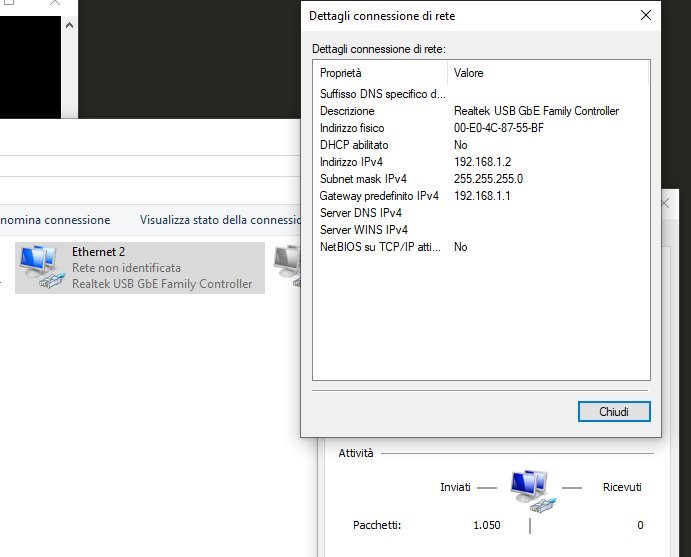
non ho altre schede a disposizione per fare prove incrociate, anche se questa di suo non ha mai dato problemi
edit: non ho idea se la cosa sia normale, ma non riesco manco a fargli pingare se stesso da uboot (al contrario di windows che almeno pinga correttamente il suo indirizzo stesso)
(IPQ40xx) # setenv ipaddr 192.168.1.1
(IPQ40xx) # setenv serverip 192.168.1.2
(IPQ40xx) # saveenv
Saving Environment to NAND...
Erasing Nand...
Erasing at 0xef000 -- 100% complete.
Writing to Nand... done
(IPQ40xx) # ping 192.168.1.1
MAC0 addr:0:3:7f:ba:db:ad
PHY ID1: 0x4d
PHY ID2: 0xd0b1
ipq40xx_ess_sw_init done
eth0
eth0 PHY0 Down Speed :10 Half duplex
eth0 PHY1 up Speed :1000 Full duplex
eth0 PHY2 Down Speed :10 Half duplex
eth0 PHY3 Down Speed :10 Half duplex
eth0 PHY4 Down Speed :10 Half duplex
Using eth0 device
ping failed; host 192.168.1.1 is not alive
(IPQ40xx) #
lo butto? 😝
